THINK · COMPUTER FOUNDATIONS · SESSION 2 OF 4
Free for everyoneNumber Keepers
Give three numbers a place to stay. Read two values, write their sum, and notice what changes when one value is replaced.
The Sage Dad · Computer Foundations · Familiar knowledge
Take it to the table.
Free for everyone. 2 pages · US Letter · No sign-in needed.
Download printable · US LetterLearner sheet + grown-up guide. No printer? Follow the instructions below with plain paper.
BEFORE YOU BEGIN
Gather a few things.
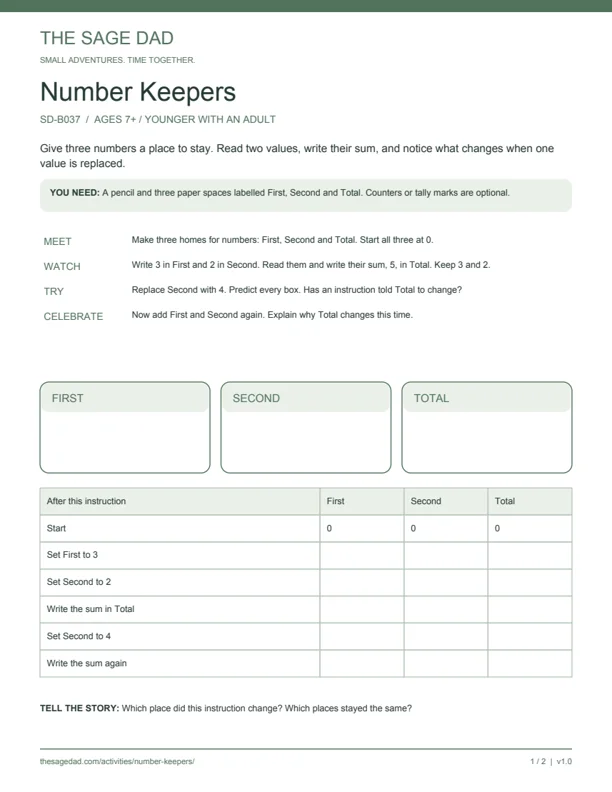
A pencil and three paper spaces labelled First, Second and Total. Counters or tally marks are optional.
What to know first
Follow an ordered plan and add small numbers using marks, fingers, or adult help.
Stored values & changing state
What this helps you understand.
Learning goal: Track separate stored values and explain that reading a value does not remove it or automatically update another value.
Why it matters: Programs need places to keep values while they work. Instructions read particular values and write a result to a particular place.
MEET · WATCH · TRY · CELEBRATE
Try it together.
Give values a home
Draw First, Second and Total. Write 0 in each. Use written numbers or draw marks rather than moving counters out of the first two spaces.
Read and write
Set First to 3 and Second to 2. Predict the sum. Read those values and write 5 in Total. First remains 3 and Second remains 2.
Change only one place
Replace Second with 4. Ask what Total holds now. It remains 5: no instruction has written a new value there.
Calculate again
Read First and Second again and replace Total with their sum. It becomes 7. Compare this with the previous step.
Test a fresh example
Reset. Set First to 2 and Second to 5. Write their sum in Total, then set First to 1. Predict all three values before checking. Finally, calculate the sum again.
One useful question
Which place did this instruction change? Which places stayed the same?
Evidence of understanding
On the fresh example, explain First = 1, Second = 5 and Total = 7 before the new addition; Total becomes 6 only after calculating again.
A little help for the grown-up.
Expected reasoning and a common misconception
The main sequence ends at First = 3, Second = 4, Total = 7. Immediately after replacing Second, Total is still 5. In the fresh example, changing First does not automatically change Total from 7; a later addition writes 6.
Listen for: “Adding uses up the numbers” or “Total updates by itself.” Keep the first two values visible and ask which instruction writes Total.
Accept pointing, speaking, drawing or writing. Finishing the sheet is not a grade.
Make it gentler
Use values up to 3, draw dots and let the adult record the rows. Keep the three spaces visible throughout.
Add a little stretch
Move the addition before the instruction that sets Second. Trace from zero. Explain why setting Second later does not repair the earlier Total.
A good place to stop
Stop when the learner can name what changed after an instruction and give a reason.
Make the support fit.
Age guides the presentation; knowledge chooses the starting point.
Explorers 4–6
use dots up to 3 and adult narration; focus on one change at a time.
Discoverers 7–9
read each space aloud before recording the next row.
Strategists 10–12
compare the old Total with a newly calculated Total.
Thinkers 13+
reorder instructions and justify why later changes do not recompute earlier results.
THE SAME IDEA, INSIDE A COMPUTER
Watch it happen in the lab.
Your paper spaces held separate values. In the lab, watch small processor storage places called registers. Reading one does not empty it.
The current adventures use a limited practice simulator. LearnRisc integration awaits the creator handoff.