COMPUTER FOUNDATIONS · FOR GROWN-UPS
Free for everyoneFour small sessions.
Understanding that grows.
Lead four hands-on computer science sessions with clear goals, age adaptations, worked answers, and direct links to the Computer Lab.
Take it to the table.
Free for everyone. 4 pages · US Letter · No sign-in needed.
Download printable · US Letter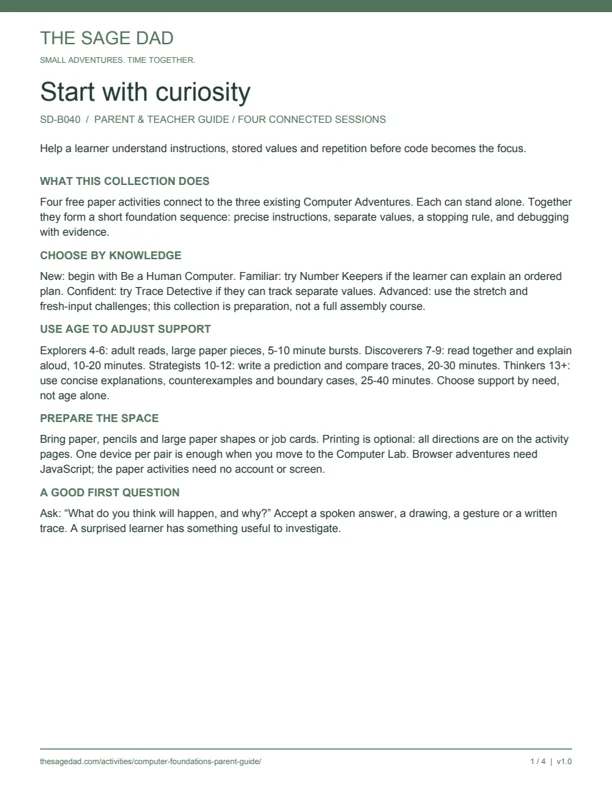
Your four-session route
- Be a Human Computer — Precise instructions & sequence · 15 minutes for the paper activity
- Number Keepers — Stored values & changing state · 20 minutes for the paper activity
- Repeat Until... — Repetition & stopping conditions · 15 minutes for the paper activity
- Trace Detective — Tracing & debugging with evidence · 25 minutes for the paper activity
Begin where the learner’s knowledge fits. Allow roughly 30 minutes when combining paper, discussion and the browser experiment; split sessions as needed.
PARENT & TEACHER GUIDE / FOUR CONNECTED SESSIONS
Start with curiosity
Help a learner understand instructions, stored values and repetition before code becomes the focus.
What this collection does
Four free paper activities connect to the three existing Computer Adventures. Each can stand alone. Together they form a short foundation sequence: precise instructions, separate values, a stopping rule, and debugging with evidence.
Choose by knowledge
New: begin with Be a Human Computer. Familiar: try Number Keepers if the learner can explain an ordered plan. Confident: try Trace Detective if they can track separate values. Advanced: use the stretch and fresh-input challenges; this collection is preparation, not a full assembly course.
Use age to adjust support
Explorers 4-6: adult reads, large paper pieces, 5-10 minute bursts. Discoverers 7-9: read together and explain aloud, 10-20 minutes. Strategists 10-12: write a prediction and compare traces, 20-30 minutes. Thinkers 13+: use concise explanations, counterexamples and boundary cases, 25-40 minutes. Choose support by need, not age alone.
Prepare the space
Bring paper, pencils and large paper shapes or job cards. Printing is optional: all directions are on the activity pages. One device per pair is enough when you move to the Computer Lab. Browser adventures need JavaScript; the paper activities need no account or screen.
A good first question
Ask: “What do you think will happen, and why?” Accept a spoken answer, a drawing, a gesture or a written trace. A surprised learner has something useful to investigate.
FACILITATION PLAN / ABOUT 30 MINUTES PER SESSION
Four sessions, one thread
Give the learner time to predict, try, explain and test a fresh example.
Session 1 / be a human computer
0-5 min: agree on three numbered boxes. 5-10: predict and move a shape. 10-20: reverse the plan and repair an unclear direction. 20-25: try the sequence adventure in the browser, or a new paper plan. 25-30: ask which instruction determines the final position. Expected evidence: the second move can change the first placement.
Session 2 / number keepers
0-5: name First, Second and Total. 5-10: predict the sum of 3 and 2. 10-20: replace Second with 4, inspect the unchanged Total, then calculate again. 20-25: try the stored-values adventure. 25-30: test First = 2, Second = 5, Total = 7, then change First to 1. Expected evidence: Total stays 7 until another addition writes 6.
Session 3 / repeat until...
0-5: predict how many moves empty three jobs. 5-10: check Left before moving. 10-20: trace the counts, then try four and zero jobs. 20-25: compare with the positive-count browser loop. 25-30: explain what changes and what stops it. Important: the paper loop checks first; the browser starter checks after a repetition and expects a positive count.
Session 4 / trace detective
0-5: state the intended sum, 3 + 4. 5-10: predict the flawed plan. 10-20: trace each instruction and repair the ordering. 20-25: test A = 5 in original and repaired plans. 25-30: explain why the totals are 7 and 9. Revisit the stored-values adventure if the learner thinks Total updates automatically.
Adapt the rhythm
For a short family session, finish one discovery and resume later. For a 45-minute class, add ten minutes for a stretch and five for pairs to compare explanations. Swap “operator” and “observer” roles halfway through.
ASSESSMENT / SUPPORT WITHOUT GRADES
Listen for understanding
A completed sheet or clicked finish button is not proof of understanding.
Needs support
The learner guesses a result but cannot show how it happened. Return to physical pieces. Model one instruction, then ask the learner to show the next. Use smaller values or fewer steps.
Developing
The learner traces correctly with prompts but struggles to explain the cause. Try a fresh input with a partner and ask “which instruction changed this value?” Give time to point, draw or speak.
Ready to extend
The learner predicts, traces and explains a fresh example independently. Try the next session or a stretch. Keep the explanation as evidence; speed is not the objective.
Misconceptions to notice
Sequence: the same instructions always give the same result. Values: reading a value removes it, or Total changes automatically. Loops: a stopping check works even if nothing changes. Debugging: a correct final answer proves every step was right. Ask the learner to show the state after the relevant instruction.
Exit ticket
“I predicted ____. I observed ____. The instruction that explains it is ____. With a new example, I would ____.” Speech, pointing, drawings and written traces are equally useful when they reveal the reasoning.
Keep a small observation record
On your own paper, record the activity, what the learner explained, the support they needed and the next step. Keep classroom records in your approved school system. There is no need to enter learner names or assessment notes into this website.
When to pause
Pause if frustration replaces curiosity. Return to a simpler physical example or stop after a useful discovery. Completing every box is optional; being able to explain one idea is valuable.
CONNECTIONS / PRIVACY / NEXT STEPS
From paper to processor
Use the same questions on paper and in the lab: what changed, what caused it, and why?
Open the matching adventure
Be a Human Computer connects to “You’re the computer.” Number Keepers connects to “Where did the number go?” Repeat Until... connects to “Again, but how many times?” Trace Detective revisits stored values and offers a loop stretch. Start at thesagedad.com/computer-lab/ and choose the matching title.
Explain the model
Paper number spaces are a teaching model. In the browser, the values sit in small processor storage places called registers. Registers are not all of computer memory. The starter simulator implements a limited instruction set. The paper notation is not executable LearnRisc code.
Keep the zero-count difference visible
The paper repetition activity asks whether anything is left before moving. Zero jobs means zero moves. The current browser starter does the body before checking and is designed for a positive starting count. Ask older learners how an extra check before the body would handle zero.
Shared devices and privacy
Paper work stays with you. The Computer Adventures store applied programs, notes and place in the browser, not in a classroom account. Avoid personal information in notes. Clear saved adventure progress before switching learners, or use a fresh browser profile. Existing website analytics follow the site consent controls.
Learnrisc is a later step
The creator handoff is pending. Connected LearnRisc lessons, its supported instruction set, and automatic feedback are not yet verified. These activities work now with paper and the existing practice lab. Advanced integration will follow capability checks and a complete tested lesson.
Reuse and return
Print at actual size on US Letter paper. Black-and-white printing is suitable. Use blank paper if a printer is unavailable. Return to a familiar activity with a new input; ask whether the learner can explain more than before. These sheets are designed for family and classroom use.